 You know, I’m not a Microsoft hater. They’ve made some good products, made some bad products, done some good things (their founder has done some great things) and done some bad things. I don’t have the inclination to paint them with the universally evil brush that others do.
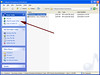
However, this is just bollocks. I don’t know why I haven’t noticed this until now, but here’s a ridiculous example of a bad thing in Windows XP. In Windows Explorer, when you browse a directory containing MP3s, the OS displays a little set of ‘Music Tasks’ in the upper-left quadrant of the screen (some very prime screen real estate). What’s the second task? “Shop for music online” (here’s a screenshot). Where does that take me? Here, to the Windows Media store.
Forgetting for a moment, that I don’t a single person who has ever bought any music from the Windows Media store, this is a heinous way to treat your customers.
I deserve to use an operating system without being frickin’ cross-sold! It’s one thing to include a buried menu item that says “Upgrade this Application” or what-have-you, but advertising to me every time I browse a music-related folder?
And you know what’s worse? I can’t turn it off. I clicked around a bit. I even asked the help. No joy.
This is the kind of subtle but odious Microsoft decision that converts people to Apple or Linux. Hopefully Windows Vista will clue in and leave the advertising out of the operating system.
 DarrenBarefoot.com
I think this feature will become more prevelent in the future. As things are now Microsoft would probably say the Windows Explorer is not part of the OS (unless they have to go to court) and is therefore simply a file browser. More and more consumer business will be conducted on the internet and this type of prompt would be seen as being useful by a lot of users.
The feature should be configurable, to not only allow you to turn it on or off, but also to allow you to specify the music store or stores that you like to buy your music from.
I agree in future versions of Windows, this will be even more common. The only good thing is it will probably be more in your face to the point where if microsoft doesn’t give as a way to take it off somebody will hack it out.
This seems very mild compared other ways you are advertised to in Windows. How about the many installations of unasked for internet services like Netzero and AOL. These may not be on every Windows install but they are all over the Dells I have installed recently.
As if the internet pop-ups aren’t bad enough, now a brand new Dell comes loaded with many popup ads for various “services.” And they don’t even use the web browser.
Don’t know whether you’re aware of this, but you can turn off the “common tasks” sidebar in windows explorer. Go to Tools > Folder Options > General tab. Under the “Tasks” section, click on “Use Windows classic folders”.
Unfortunately, you can’t customize it – this setting removes the whole sidebar, but it’s better than nothing.
Per Eric Ose above, the Netzero and AOL installations don’t really have anything to do with Windows – as you pointed out, it’s only Dell computers that have these pre-installed, since it’s Dell that is putting them on there. If Windows was going to advertise ISP options, it would probably only be pushing Sympatico. But it wouldn’t be labeled as such – part of Microsoft’s apparent strategy is to blur the lines between your local computer and the ‘net (or rather, the .NET). I imagine that most things will end up labeled as vaguely as the link to the Windows Media store. “Click here to search the encyclopeadia” will take you to MSN Encarta where you can sign up for a year long subscription, “Click here for email” will take you to MSN Hotmail where they’ll ask you to get a Premium account, etc., etc.
John: I am aware of that, and have done that in the past on various computers. That’s ultimately what I’ll probably do.
I agree that this is evil. Why is it happening? How did it survive Microsoft’s user testing, focus groups, beta testers, and so on? One answer is that Microsoft is looking for alternate revenue streams to protect itself from any legally challengable actions it might undertake, and sadly, that this comes at the expense of the user interface. Another might be that this is standard operating procedure for Microsoft, and other big companies, who see customers simply as cash dispensers. Three might be that this is just more “integration” that customers have rejected over and over again and that the courts have rejected over and over again. They all point towards the disappointing conclusion that leopards don’t change their spots. I agree with the other posters — this behavior will only continue until Microsoft loses as much share as the “Big 3” automakers did.
Like others mentioned, it will probably become more prevalent. And I think it is a great feature – it just needs the ability to be customized! Let me pick which store I want to buy music from!
For the vast majority of users, that little link is probably quite handy.
Don’t forget the file/web metadata thing they tried to pawn off until there was an uproar.
It “worked” in every MS app – if you were in WORD and typing a letter on the peach pie you just had at grandmas – their plan was if you hovered over peach – they would go and fetch a link like peachpie.com so if you clicked on peach in MS word, off you go. Of course, companies that paid MS would get listed first. Of course, MS couldn’t see how this might be an intrusion at all – if you’re typing some random word in your house on your laptop, you mean you don’t want it sent back to MS so they could send you a web page of an advertiser? You are using their OS – why not? Of course, Ms is trying to bring it back but that’s MS for you – completely clueless about consumers (MS is what zero for 25 since 1995 in products for consumers?) … oh here is a hilarious Vista CES video as it should be …
http://tauquil.com/archives/2006/01/06/re-introducing-the-real-windows-vista/
It’s interesting: how much possible money are they making from this? Is it enough to offset the annoyance of their users?
Maybe, if more people make a stink about it they’ll drop it. I can’t imagine them getting many traffic this way other than mistaken clicks.
You know what’s bad? Not two days after reading about this atrocity, I find a “mini” version of the store showing up in my iTunes library:
http://www.flickr.com/photos/24859815@N00/85233749/
I guess this isn’t the first time Apple’s advertised the store in iTunes; there’ve been store-links beside track names in the form of arrows for some time now, but they’ve been pretty unintrusive, to the point that I only notice them when I need them. This is a whole lot more noticable.
To be fair, I guess I should point out, you can turn both features off without losing other features simultaneously. But they’re both on by default.
And… Boing Boing with the followup:
http://www.boingboing.net/2006/01/11/itunes_update_spies_.html